Petals Studio

The dialog to choose the services to invoke is not enough intuitive

Details

  • Type: Bug Bug
  • Status: Closed Closed
  • Priority: Major Major
  • Resolution: Fixed
  • Affects Version/s: 1.1.1
  • Fix Version/s: 1.1.1
  • Component/s: Petals Tools
  • Security Level: Public
  • Description:
    Hide

    There is a problem in the creation of a SE EIP with the pattern router with the creation wizard.
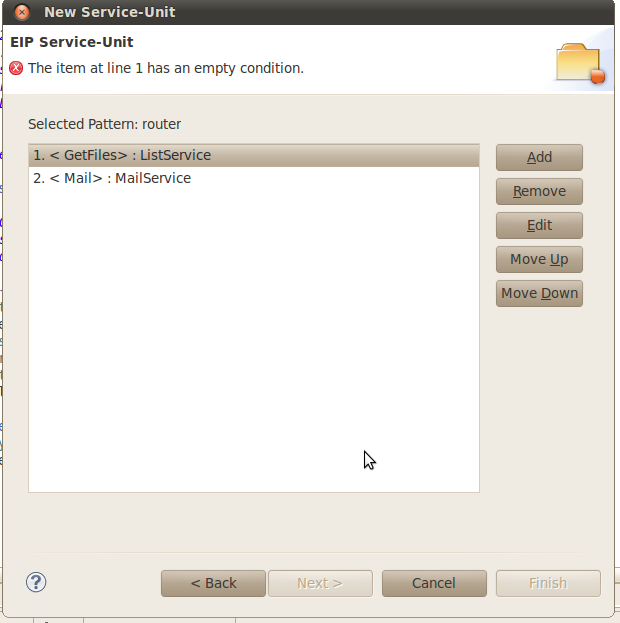
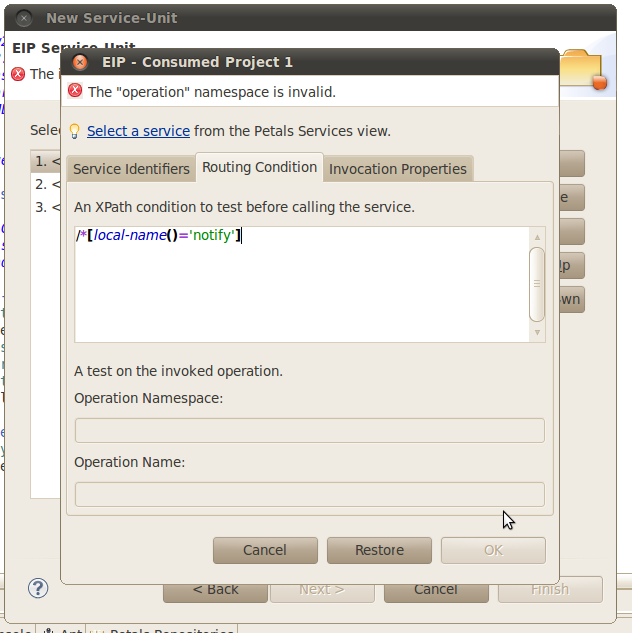
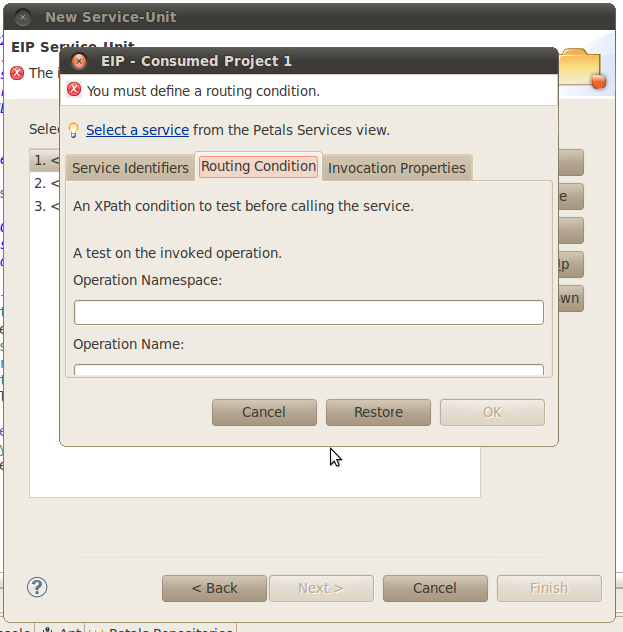
    In the dialog box, on the page where you select the services to consume (cf EIP_router_1.png), if you edit a consumed service an try to enter a running condition (XPath or operation), there is the following error message "The "operation" namespace is invalid" displayed at the top of the dialog box and it is impossible to click on OK (cf EIP_router_2.png).
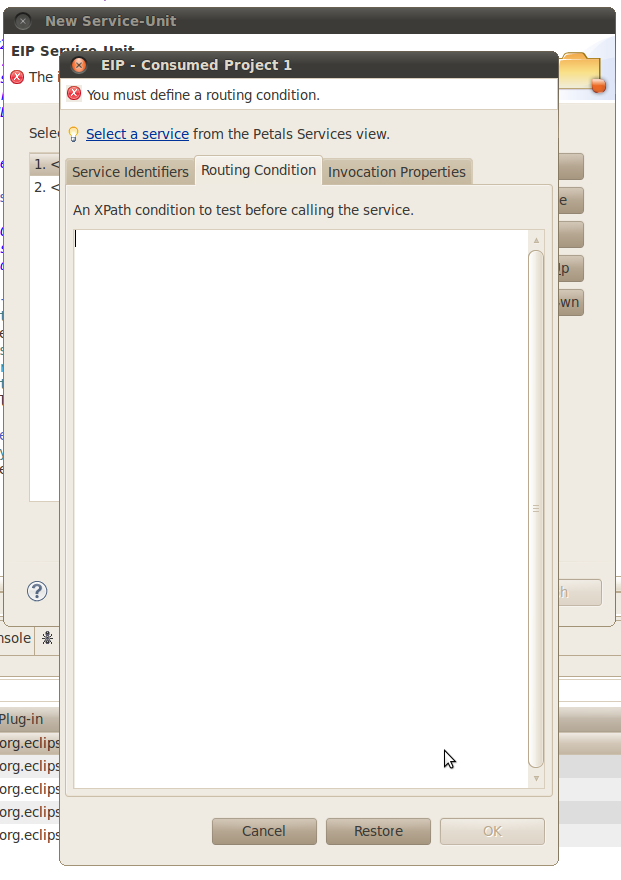
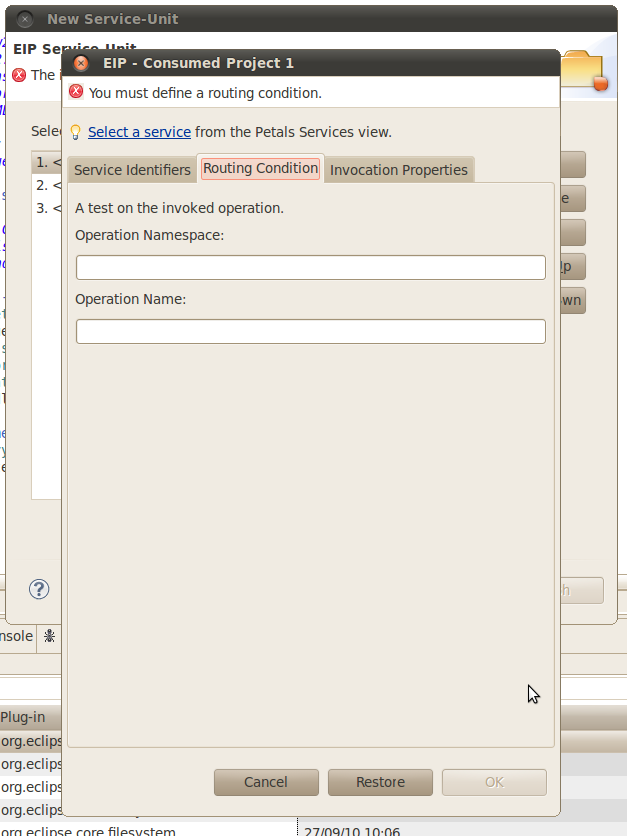
    Then if you click on Cancel and try again to edit the same consumed service to enter a running condition, it is only possible the XPath expression or the operation but not the both (although you clicked on Cancel previously) (cf EIP_router_3.png & cf EIP_router_4.png).

    On another hand, the height of the consumed project edition dialog box must be greater because when you open this dialog box and you clicked on the tab Routing Condition, it is necessary to increase the height to see all the content of the tab (cf EIP_router_5.png).

    Show
    There is a problem in the creation of a SE EIP with the pattern router with the creation wizard. In the dialog box, on the page where you select the services to consume (cf EIP_router_1.png), if you edit a consumed service an try to enter a running condition (XPath or operation), there is the following error message "The "operation" namespace is invalid" displayed at the top of the dialog box and it is impossible to click on OK (cf EIP_router_2.png). Then if you click on Cancel and try again to edit the same consumed service to enter a running condition, it is only possible the XPath expression or the operation but not the both (although you clicked on Cancel previously) (cf EIP_router_3.png & cf EIP_router_4.png). On another hand, the height of the consumed project edition dialog box must be greater because when you open this dialog box and you clicked on the tab Routing Condition, it is necessary to increase the height to see all the content of the tab (cf EIP_router_5.png).
  • Environment:
    os:Linux PetalsStudio:RC 1.1

Activity

Transition Status Change Time Execution Times Last Executer Last Execution Date
New New Open Open
8h 11m
1
Vincent Zurczak
Mon, 27 Sep 2010 - 20:29:08 +0200
Open Open In Progress In Progress
15s
1
Vincent Zurczak
Mon, 27 Sep 2010 - 20:29:23 +0200
In Progress In Progress Open Open
2h 19m
1
Vincent Zurczak
Mon, 27 Sep 2010 - 22:49:19 +0200
Open Open In Progress In Progress
11h 12m
1
Vincent Zurczak
Tue, 28 Sep 2010 - 10:01:20 +0200
In Progress In Progress Open Open
9h 17m
1
Vincent Zurczak
Tue, 28 Sep 2010 - 19:19:09 +0200
Open Open In Progress In Progress
16h 9m
1
Vincent Zurczak
Wed, 29 Sep 2010 - 11:28:24 +0200
In Progress In Progress Resolved Resolved
4h 10m
1
Vincent Zurczak
Wed, 29 Sep 2010 - 15:38:33 +0200
Resolved Resolved Closed Closed
41s
1
Vincent Zurczak
Wed, 29 Sep 2010 - 15:39:14 +0200

People

Dates

  • Created:
    Mon, 27 Sep 2010 - 12:17:47 +0200
    Updated:
    Wed, 29 Sep 2010 - 15:43:58 +0200
    Resolved:
    Wed, 29 Sep 2010 - 15:38:33 +0200