Petals Studio

BPEL graphical designer does not handle WSDL properly

Details

  • Type: Bug Bug
  • Status: Closed Closed
  • Priority: Major Major
  • Resolution: Fixed
  • Affects Version/s: 1.1.0
  • Fix Version/s: 1.1.1
  • Component/s: BPEL Tools
  • Security Level: Public
  • Description:
    Hide

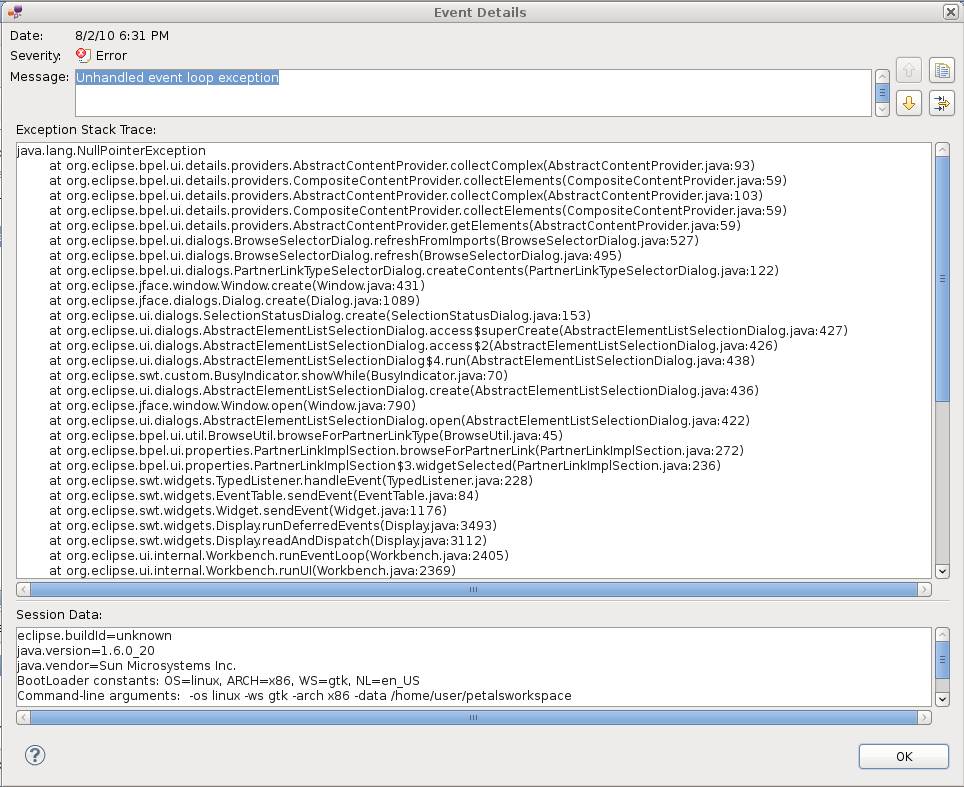
    I have a lot of problems with the graphical editor of the Studio, it can't do anything without having any error in the error console.

    For instance :

    • I generate a new BPEL sketch project
    • I put my WSDL with its XSD in this very project
    • I delete the default partner, all variables, all imports in the BPEL source code (to start from a blank project)
    • I create a new partner...and when I want to affect him a type, when I click on the "Browse" button I got an error in the error console
    • The partner link manager pops up...but when I select my WSDL and click on the "Add WSDL" button, nothing. It is not imported and I got errors in the error console
    Show
    I have a lot of problems with the graphical editor of the Studio, it can't do anything without having any error in the error console. For instance :
    • I generate a new BPEL sketch project
    • I put my WSDL with its XSD in this very project
    • I delete the default partner, all variables, all imports in the BPEL source code (to start from a blank project)
    • I create a new partner...and when I want to affect him a type, when I click on the "Browse" button I got an error in the error console
    • The partner link manager pops up...but when I select my WSDL and click on the "Add WSDL" button, nothing. It is not imported and I got errors in the error console
  • Environment:
    Petals Studio 1.1
  1. FAIS011-2.wnk
    (8.24 MB)
    Charles Casadei
    Thu, 5 Aug 2010 - 14:05:46 +0200
  2. FAIS011.zip
    (6 kB)
    Charles Casadei
    Thu, 5 Aug 2010 - 14:05:46 +0200
  1. image001.jpg
    (166 kB)

Activity

Hide
Vincent Zurczak added a comment - Tue, 10 Aug 2010 - 18:37:55 +0200

Commit # 1571
The use case was the following:
1. Copy a WSDL (with its dependencies) in a BPEL project (in the "jbi" directory).
2. Create a new partner link.
3. In its properties, click "Browse...".
4. Click "Add WSDL".
5. Select the copied WSDL and click OK.

We would have expected to see the WSDL imported.
Whereas this action resulted in an error in the log. Several ones in fact.

+ Invalid Thread access (UI)
+ Issues with platform URIs
+ Issues with the computation of relative URIs

The following actions were undertaken:
=> Fixed the invalid thread access.
=> Replaced platform URLs by absolute file URLs.
=> Updated the way relative URIs are computed.

The use case now works correctly, with:
+ WSDL files from the same directory (Eclipse resource).
+ WSDL files from other projects (Eclipse resource).
+ WSDL files taken from the disk (File resource).
+ WSDL files identified by an URL (URL resource).

The creation of partner links (with a partner link type and a partner role) has been tested for each kind of import.
Once saved, the BPEL process was completely valid.

Show
Vincent Zurczak added a comment - Tue, 10 Aug 2010 - 18:37:55 +0200 Commit # 1571 The use case was the following: 1. Copy a WSDL (with its dependencies) in a BPEL project (in the "jbi" directory). 2. Create a new partner link. 3. In its properties, click "Browse...". 4. Click "Add WSDL". 5. Select the copied WSDL and click OK. We would have expected to see the WSDL imported. Whereas this action resulted in an error in the log. Several ones in fact. + Invalid Thread access (UI) + Issues with platform URIs + Issues with the computation of relative URIs The following actions were undertaken: => Fixed the invalid thread access. => Replaced platform URLs by absolute file URLs. => Updated the way relative URIs are computed. The use case now works correctly, with: + WSDL files from the same directory (Eclipse resource). + WSDL files from other projects (Eclipse resource). + WSDL files taken from the disk (File resource). + WSDL files identified by an URL (URL resource). The creation of partner links (with a partner link type and a partner role) has been tested for each kind of import. Once saved, the BPEL process was completely valid.

People

Dates

  • Created:
    Thu, 5 Aug 2010 - 14:02:53 +0200
    Updated:
    Tue, 10 Aug 2010 - 18:38:01 +0200
    Resolved:
    Tue, 10 Aug 2010 - 18:37:55 +0200